Accounts, not isolated clicks
See recorded activity across the company, with contact, anonymous, and company lanes where available. Keep an account-level match distinct from a known person.
SALESTOOLS / ATTRIBUTION
Connect the visits, conversations, and people behind your pipeline. See how paid traffic and outbound work together—from the first recorded touch to a reply, a meeting, or a closed deal.
Two contact lanes. Four earlier touches. One account story.
A website session classified from its paid landing context. This example does not represent an ad impression or identify an individual viewer.
Simplified model illustration, not a live report. Actual credit depends on the stage, eligible touchpoints, attribution window, and available account data. Attribution describes recorded journeys; it does not prove causation.
INSIDE SALESTOOLS
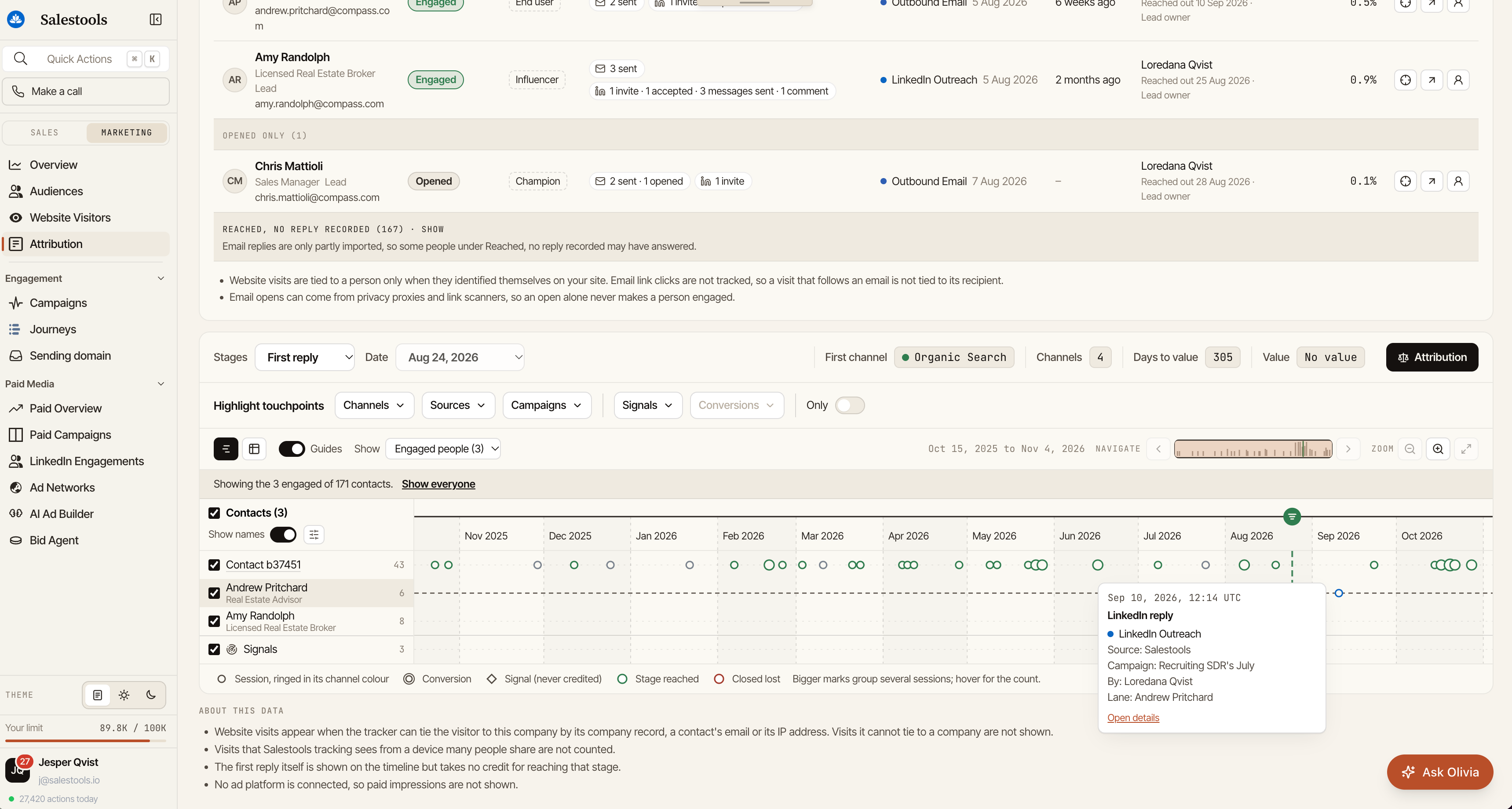
Explore contacts, channels, campaign activity, and the timeline behind an account—all in one view.
BEYOND THE LAST CLICK
See recorded activity across the company, with contact, anonymous, and company lanes where available. Keep an account-level match distinct from a known person.
Separate sent outreach, opens, and meaningful engagement. See the people who replied, accepted a connection, or took another recorded action.
Inspect source, channel, campaign, timestamp, and recorded teammate activity. Use coverage notes to understand what the timeline can—and cannot—show.
LINKEDIN ADS + YOUR WIDER GTM
A tracked LinkedIn Ads landing session can appear as Paid Social, alongside organic visits, email, LinkedIn outreach, calls, meetings, and CRM activity matched to the account.
Review the path before a selected stage instead of asking one channel to tell the whole story.
Explore your attribution setup ↗The account-attribution code recognizes paid landing context, including LinkedIn click identifiers. It currently does not import ad impressions or ad clicks without a tracked website visit into the account journey.
A company-matched visit does not identify everyone who saw an ad. Coverage depends on tracking, account matching, source imports, and connected systems.
FROM ACTIVITY TO OUTCOME
Explore attribution to replies, meetings, opportunities, and won deals. Compare how credit changes under first-touch, last-touch, linear, U-shaped, W-shaped, time-decay, and data-driven models.
Data-driven attribution has readiness requirements and displays a linear fallback when those requirements are not met. CRM value and revenue views depend on the deal data available.
Which earlier touches led up to the conversation?
↗What happened before the meeting milestone?
↗Which channels appear on the path to pipeline?
↗What journey preceded the recorded deal outcome?
↗FIVE VIEWS. ONE ACCOUNT-BASED FOUNDATION.
Find engaged companies and open their journeys.
Understand the contacts and buying-group activity.
Compare channel and campaign credit for a stage.
Examine the structure and timing of recorded paths.
Inspect imported sources, freshness, and missing data.
No. Website sessions need a supported account match to appear on that account’s journey. A person lane requires an appropriate identity link; an IP-to-company match is not person identification.
Not on its own. Opens can be affected by privacy proxies and scanners. The product separates reach and opens from stronger engagement. Email link clicks are not currently tracked for recipient-to-visit stitching.
Signals can provide context on the timeline, but are not credited as marketing touches. The event that establishes a selected stage is also distinct from the earlier touches evaluated for that stage.
Use Data coverage and the journey’s coverage notes to inspect sources and imports. Some reply history is only partly imported. Missing CRM values, unmatched sessions, or unavailable ad data should remain visible as gaps.
CONNECT MARKETING AND SALES